
A trigger order in stock trading is a conditional trading order that stays inactive on your broker’s system until the stock hits a specific price threshold (the trigger price). Once hit, the system automatically activates the order and sends it to the stock exchange as a market or limit order.
In this guide, you will learn what a trigger order is, how it works, and how to use it effectively
A trigger order is a type of conditional trading order. Unlike a standard order that goes directly to the stock market exchange right after you submit it, a trigger order stays dormant on your broker’s private server.
It exists to solve a common problem: trading based on market conditions without having to execute orders manually in real time. It is used across various markets, including equities, derivatives, and commodities, for two primary reasons:
By placing a trigger order, you instruct your broker: “Do not send this order to the stock exchange until the market price reaches my specified trigger level.”
Understanding support and resistance levels can help traders identify the price points they may want to use when setting a trigger order.
If your goal is to limit potential losses, it is also useful to understand how stop-loss orders work before choosing a trigger-based exit.
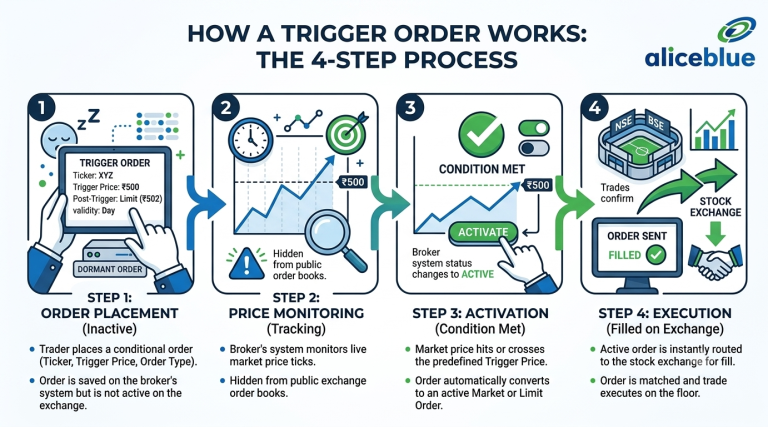
Understanding how a trigger order works in practice involves a simple four-step logical flow:
To see how this works in a practical scenario, consider a breakout trade:
Traders using breakout strategies often use predefined price levels to decide when they want to enter a position.
Trigger orders are one part of a broader risk-management approach, which also includes position sizing, stop-loss levels and portfolio diversification.
Understanding where a trigger order fits alongside other order types helps avoid confusion during live trading:
Feature | Trigger Order | Standard Limit Order | Stop-Loss Order |
Where It Lives | Broker’s Server | Exchange Order Book | Broker’s Server or Exchange |
Visibility | Hidden until triggered | Publicly visible immediately | Often hidden until price met |
Primary Goal | Automate conditional entry or exit | Buy/Sell at a specific price or better | Limit downside loss on open positions |
When to Use | Breakouts, automated strategies | Buying dips or setting profit targets | Risk management on held stocks |
A trigger order in stock trading is one of the most effective tools for building discipline and automating your trading strategies. By allowing you to set predefined price conditions for entering and exiting trades, it removes emotion, protects your capital, and saves valuable time.
Whether you are capturing price breakouts or setting up automated stop-loss protection, mastering how to set and manage trigger orders will significantly enhance your trading efficiency. Take time to test conditional orders on your broker platform today to streamline your stock market execution.
No. A trigger order guarantees that your order will be submitted to the exchange once the trigger price is reached. Execution depends on market liquidity and whether you selected a market or limit order.
On most brokerage platforms, funds are not blocked when you place a buy trigger order. Your margin or account balance is only checked and blocked once the trigger condition is met and sent to the exchange.
The trigger price is the benchmark that activates your order on the broker server. The limit price is the maximum price you are willing to pay (for buys) or the minimum price you are willing to accept (for sells) once the order hits the market.
It depends on your selection. A Day Trigger Order expires at the end of the trading session if the trigger price is not hit. A Good-Till-Triggered (GTT) order can remain active for up to 365 days or until activated.
Here are high-intent, practical FAQs to add to your blog. These address edge cases, advanced scenarios, and practical concerns that readers will naturally have while reading, without repeating any concepts already covered in the main article.
No. On most retail brokerage platforms, conditional trigger orders (including GTT orders) only monitor live price ticks during regular market hours (9:15 AM to 3:30 PM IST). Price spikes or gaps occurring during pre-market auctions or post-market closing sessions will generally not activate your server-side trigger order.
Yes, but you should use an OCO (One-Cancels-the-Other) or Bracket Order feature rather than placing two individual orders. An OCO trigger links both conditions together: as soon as either your target price or stop-loss price is hit, the system executes that order and automatically cancels the remaining one, preventing accidental double-trades.
If you manually exit your position, your broker’s server does not automatically cancel your existing sell trigger order. If the market later reaches that trigger price, the system will attempt to execute the order. Since you no longer hold the shares, the order will either be rejected for insufficient holdings or potentially trigger an unintended short-sell position. Always manually cancel pending trigger orders after exiting trades early.
No. Brokers do not charge fees for placing, storing, or modifying dormant trigger orders on their servers. Standard brokerage rates, statutory taxes (such as STT), and exchange transaction charges are applied only when the trigger condition is met, and the trade successfully executes on the stock exchange.
Yes. Trigger orders, especially Trigger-Limit and Stop-Loss Market (SL-M) orders, are widely used in F&O trading. Options traders frequently use them to enter positions on premium breakouts or to automatically cut losses if an option premium drops below a critical support level.
Attention Investors!
Stock Brokers can accept securities as margin from clients only by way of pledge in the depository system w.e.f. September 1, 2020. Update your mobile number & email Id with your stock broker/depository participant and receive OTP directly from the depository on your email id and/or mobile number to create a pledge. Pay 20% upfront margin of the transaction early to trade in the cash market segment. Investors may please refer to the Exchange’s Frequently Asked Questions (FAQs) issued vide circular reference NSE/INSP/45191 dated July 31, 2020, and NSE/INSP/45534 dated August 31, 2020, and other guidelines issued from time to time in this regard. Check your Securities /MF/ Bonds in the consolidated account statement issued by NSDL/CDSL every month.
Corporate Office: No. 153/2, 3rd Floor, M.R.B.Arcade, Bagalur Main Road, Dwaraka Nagar, Yelahanka, Bengaluru – 560 063, Karnataka.
Registered Office: Old No.56/2 ,New No.58, LIC Nagar, Vinayagar Kovil Street, Erode -8,Tamil Nadu– 638002.
Alice Blue Financial Services (P) Ltd : NSE EQ | NSE FO | NSE CDS-90112 SEBI REG : INZ000156038
Alice Blue Financial Services (P) Ltd : BSE EQ | BSE FO | BSE CD-6670 SEBI REG : INZ000156038
Alice Blue Financial Services (P) Ltd : CDSL DP ID 12085300 DP SEBI REG : IN-DP-364-2018
Alice Blue Financial Services (P) Ltd : MCX-56710 SEBI REG : INZ000156038
We hereby declare that we are doing PRO trading
Procedure to file a complaint on SEBI SCORES : Register on SEBI SCORES 2.0. Mandatory details for filing complaints on SCORES: Name, PAN, Address, Mobile Number, E-mail ID. Benefits: Effective Communication, Speedy redressal of the grievances
Click on the provided link to learn about the process for submitting a complaint on the ODR platform for resolving investor grievances.
Investment in securities markets are subject to market risks, read all the related documents carefully before investing. Brokerage will not exceed SEBI prescribed limit.
For queries regarding account opening or activation, email to [email protected] and for fund updates, email to [email protected]
Disclaimer : Prevent unauthorized transactions in your account. Update your mobile numbers/email IDs with your stock brokers. Receive information of your transactions directly from Exchange on your mobile/email at the end of the day. Issued in the interest of investors. All clients have to update their email id and mobile number with Member : Investor Grievance [email protected]
KYC is a one time exercise while dealing in securities markets – once KYC is done through a SEBI registered intermediary (broker, DP, Mutual Fund etc.), you need not undergo the same process again when you approach another intermediary.
No need to issue cheques by investors while subscribing to an IPO. Just write the bank account number and sign in the application form to authorise your bank to make payment in case of allotment. No worries for refund as the money remains in the investor’s account.
Investors are requested to note that Alice Blue Financial Services Private Limited is permitted to receive money from investor through designated bank accounts only named as Up streaming Client Nodal Bank Account (USCNBA). Alice Blue Financial Services Private Limited is also required to disclose these USCNB accounts to Stock Exchange. Hence, you are requested to use following USCNB accounts only for the purpose of dealings in your trading account with us. The details of these USCNB accounts are also displayed by Stock Exchanges on their website under “Know/ Locate your Stock Broker. Bank Details (Valid UPI FAQ).


