
Applying for an IPO sounds simple until you’re actually doing it. You check the subscription number in the morning, get busy, forget to check again in the afternoon, and by the time you remember, the issue has closed. Or you see an IPO getting heavy demand and rush to apply without really thinking it through.
That gap between wanting to invest and actually showing up on time is where most retail investors lose out on IPOs, not stock selection. With the launch of Smart IPO, Alice Blue is closing that gap by letting you set your investment criteria once and having the application happen on its own when conditions match.
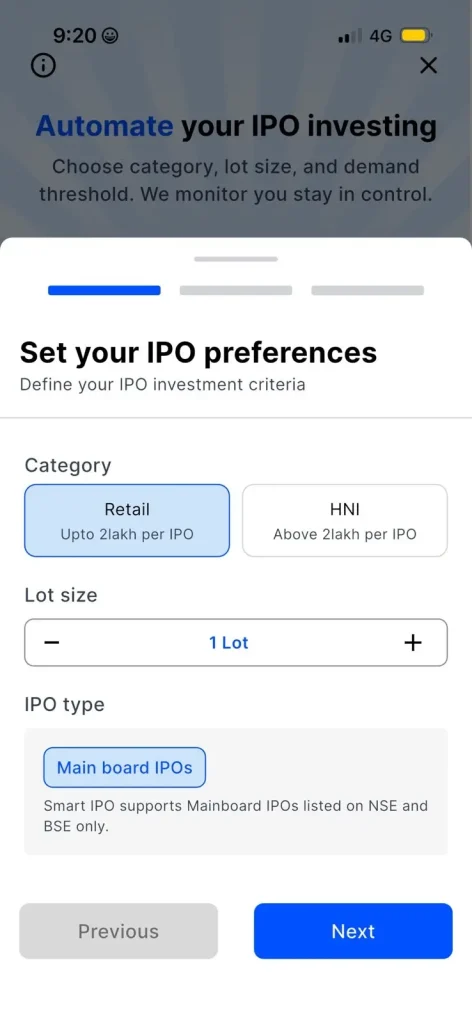
The experience begins on a single screen where you set the basics of how you want to participate. You choose your Category. Retail if you’re investing up to ₹2 lakh per IPO, or HNI if you’re going above that. You also set your Lot size using a simple plus/minus control, and the IPO type is fixed to Mainboard IPOs listed on NSE and BSE, since that’s what Smart IPO currently supports.
The idea behind keeping this screen short is straightforward: get the setup done in under a minute so you can move on to the part that actually matters, deciding when you want your applications to trigger.
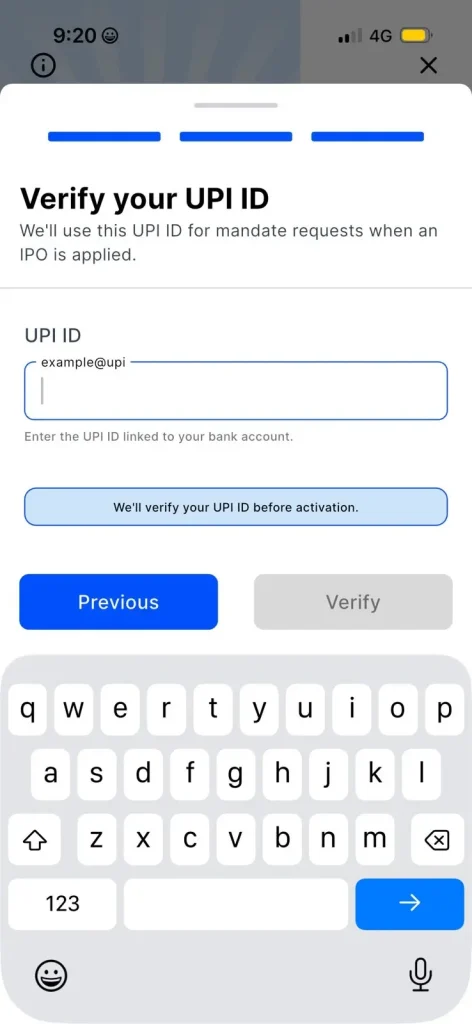
Once your preferences are set, Smart IPO asks you to enter and verify the UPI ID linked to your bank account. This isn’t a formality. This same UPI ID is what gets used later to send you a mandate request the moment an application is placed on your behalf, so Alice Blue checks it upfront rather than at the time an IPO closes.
Instead of discovering a UPI issue during a live IPO window, when there’s no time to fix it, you sort it out during setup, when there’s no pressure at all.
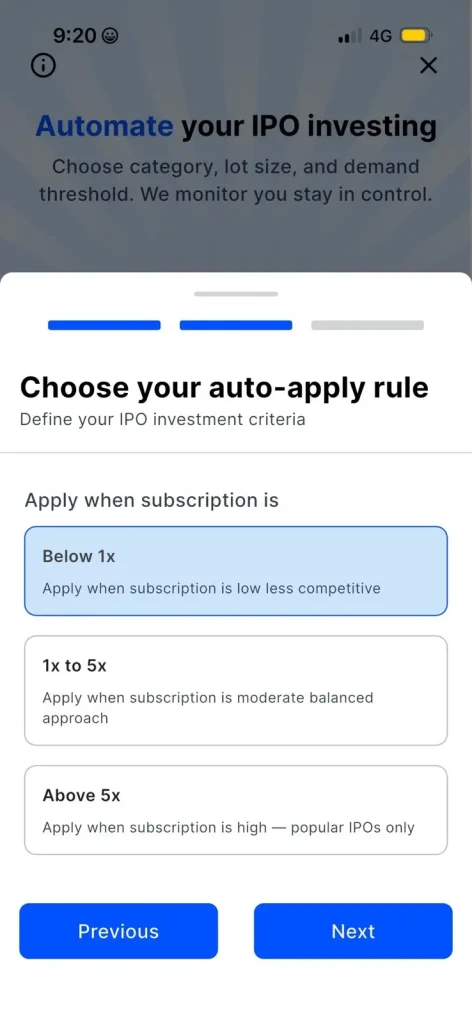
This is the part that actually decides how Smart IPO behaves for you. On the final setup screen, you choose your auto-apply rule based on subscription levels. Below 1x, 1x to 5x, or Above 5x.
Once this is selected, your Smart IPO setup is complete, and the feature goes live for future Mainboard IPOs.
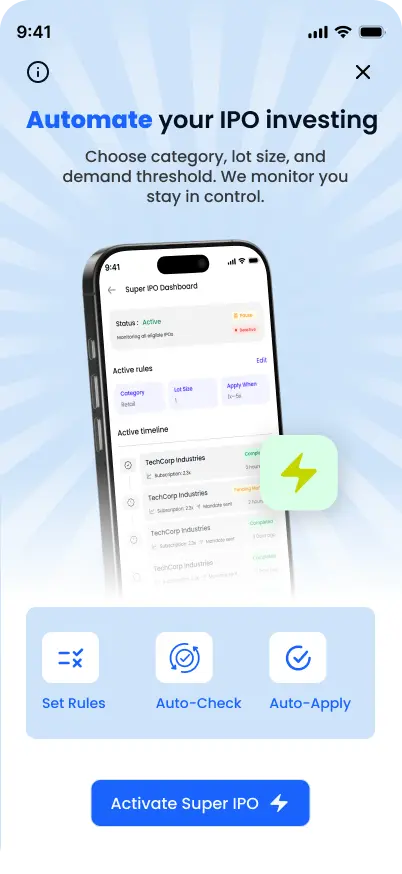
From here, the process runs in the background. Alice Blue tracks live subscription data for eligible Mainboard IPOs and checks it against the rule you’ve set. The moment your condition is met, your application for the lot size you chose gets placed automatically, and a UPI mandate request is sent to your bank app right after.
You still need to approve that mandate yourself. Smart IPO handles the timing and the tracking, but the payment authorization stays in your control.
Once approved, the bid amount gets blocked in your account, not deducted, and it’s only debited if you’re actually allotted shares.
If an IPO closes without your rule ever being met, nothing happens on your end. No application, no mandate, no money blocked. Smart IPO waits for your condition to be true rather than applying just because an IPO happens to be open.
Since the whole point of Smart IPO is to reduce manual tracking, notifications carry a lot of the weight here. You get notified when your application is triggered, when your mandate status changes, and later when allotment and listing updates come through.
All of this is also visible on a dedicated Smart IPO dashboard, which shows your active rule, the lots applied for each IPO, current mandate status, and a running history of past Smart IPO applications. You can edit your preferences or turn the feature off from here whenever your situation changes.
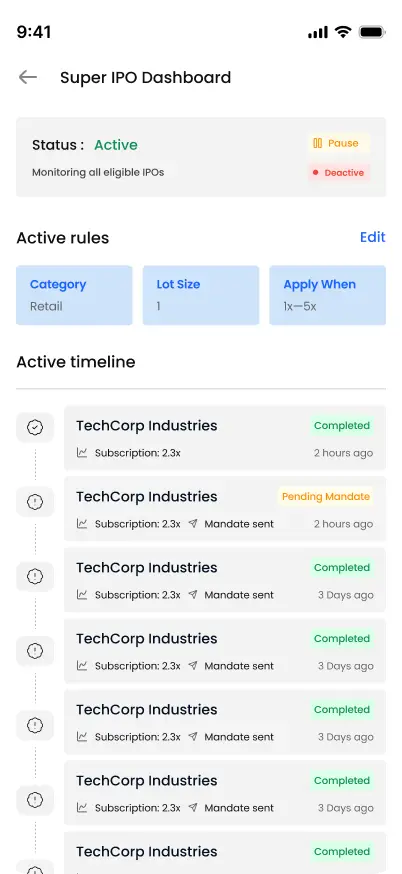
Smart IPO suits investors who are comfortable letting a subscription-based rule decide the timing of their application. Retail investors who apply occasionally can use it to stop missing deadlines they’d otherwise forget about, while HNI investors tracking multiple IPOs can stay consistent without checking subscription data throughout the day.
It’s less suited for those who prefer to evaluate each IPO individually, based on things like anchor investor participation or grey market premium, since Smart IPO applies purely on the subscription condition you’ve set. It also automates the tracking and application step, not the decision of whether an IPO is worth investing in.
A few things stay on you regardless: keeping enough balance in your linked account when the mandate hits, approving that mandate on time, and reviewing your rule occasionally to make sure it still matches how you want to invest. The feature currently covers Mainboard IPOs only, with one active rule per account at a time.
IPO investing already involves enough uncertainty around allotment. Missing an application because of a forgotten deadline shouldn’t be part of that uncertainty. Smart IPO brings preference setup, UPI verification, subscription-based rules, and automatic application into a single connected flow inside Alice Blue.
A more consistent way to participate in IPOs, without needing to watch the market all day.
Attention Investors!
Stock Brokers can accept securities as margin from clients only by way of pledge in the depository system w.e.f. September 1, 2020. Update your mobile number & email Id with your stock broker/depository participant and receive OTP directly from the depository on your email id and/or mobile number to create a pledge. Pay 20% upfront margin of the transaction early to trade in the cash market segment. Investors may please refer to the Exchange’s Frequently Asked Questions (FAQs) issued vide circular reference NSE/INSP/45191 dated July 31, 2020, and NSE/INSP/45534 dated August 31, 2020, and other guidelines issued from time to time in this regard. Check your Securities /MF/ Bonds in the consolidated account statement issued by NSDL/CDSL every month.
Corporate Office: No. 153/2, 3rd Floor, M.R.B.Arcade, Bagalur Main Road, Dwaraka Nagar, Yelahanka, Bengaluru – 560 063, Karnataka.
Registered Office: Old No.56/2 ,New No.58, LIC Nagar, Vinayagar Kovil Street, Erode -8,Tamil Nadu– 638002.
Alice Blue Financial Services (P) Ltd : NSE EQ | NSE FO | NSE CDS-90112 SEBI REG : INZ000156038
Alice Blue Financial Services (P) Ltd : BSE EQ | BSE FO | BSE CD-6670 SEBI REG : INZ000156038
Alice Blue Financial Services (P) Ltd : CDSL DP ID 12085300 DP SEBI REG : IN-DP-364-2018
Alice Blue Financial Services (P) Ltd : MCX-56710 SEBI REG : INZ000156038
We hereby declare that we are doing PRO trading
Procedure to file a complaint on SEBI SCORES : Register on SEBI SCORES 2.0. Mandatory details for filing complaints on SCORES: Name, PAN, Address, Mobile Number, E-mail ID. Benefits: Effective Communication, Speedy redressal of the grievances
Click on the provided link to learn about the process for submitting a complaint on the ODR platform for resolving investor grievances.
Investment in securities markets are subject to market risks, read all the related documents carefully before investing. Brokerage will not exceed SEBI prescribed limit.
For queries regarding account opening or activation, email to [email protected] and for fund updates, email to [email protected]
Disclaimer : Prevent unauthorized transactions in your account. Update your mobile numbers/email IDs with your stock brokers. Receive information of your transactions directly from Exchange on your mobile/email at the end of the day. Issued in the interest of investors. All clients have to update their email id and mobile number with Member : Investor Grievance [email protected]
KYC is a one time exercise while dealing in securities markets – once KYC is done through a SEBI registered intermediary (broker, DP, Mutual Fund etc.), you need not undergo the same process again when you approach another intermediary.
No need to issue cheques by investors while subscribing to an IPO. Just write the bank account number and sign in the application form to authorise your bank to make payment in case of allotment. No worries for refund as the money remains in the investor’s account.
Investors are requested to note that Alice Blue Financial Services Private Limited is permitted to receive money from investor through designated bank accounts only named as Up streaming Client Nodal Bank Account (USCNBA). Alice Blue Financial Services Private Limited is also required to disclose these USCNB accounts to Stock Exchange. Hence, you are requested to use following USCNB accounts only for the purpose of dealings in your trading account with us. The details of these USCNB accounts are also displayed by Stock Exchanges on their website under “Know/ Locate your Stock Broker. Bank Details (Valid UPI FAQ).


