
If you are a beginner trader in India and want to use a DIY strategy builder to create your own trading plan without coding, this guide is for you. A DIY Builder helps you turn your market idea into clear rules, test them on past data, and then use them carefully in live trading.
In this guide, you will learn what a DIY strategy builder is, how it works, the different types available, and how to use one step by step. You will also see a simple example with numbers, understand the benefits and risks, and get a 30-day plan to start safely.
A DIY Builder is a no-code tool that lets you create custom trading strategies. You can combine option positions, use technical indicators like RSI and moving averages, or connect TradingView alerts through webhooks. You set entry and exit rules, define targets and stop losses, and choose how to test and run the strategy.
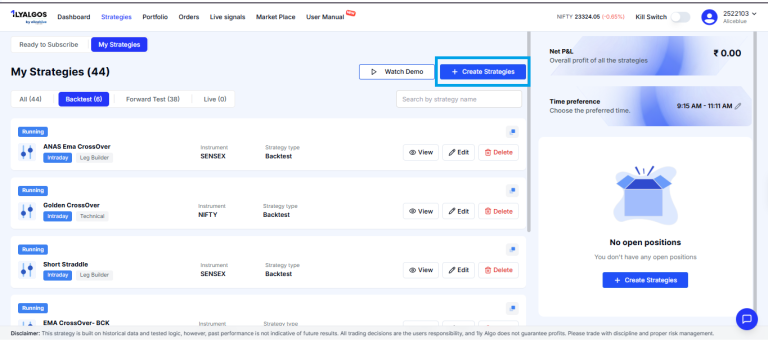
A DIY strategy builder is a tool that helps you create your own rule-based trading plan without coding. Instead of only using ready-made strategies, you design one that matches how you see the market, which instruments you like, and how much risk you can take.
In simple words, you tell the builder, Enter a trade when X happens, exit when Y happens, and never lose more than Z. The tool then follows those rules.
This is useful if you:
A DIY Builder does not predict the market or guarantee profit. It only follows the rules you set. If the rules are weak, the strategy can still lose money.
In India, retail algorithmic trading is subject to SEBI and exchange rules. Always check your broker’s latest guidelines before using automated strategies.
If you are new to the market, start by learning stock market basics, then move to options trading and technical analysis before using advanced builders.
The exact steps may differ slightly across platforms, but the core flow is similar. Think of it as turning your trading idea into a checklist that the system can follow.
First, decide what kind of strategy you want:
Your choice changes your margin requirement, overnight risk, and how often you need to check your trades.
Select the market you want to trade, for example:
Each instrument has its own lot size, liquidity, volatility, and margin requirements. For Nifty 50 options, the lot size is 65 units from January 2026 onwards.
Entry rules tell the builder when to start a trade. They must be clear and specific.
Examples:
Avoid vague rules like buy when the market looks strong. The builder needs exact conditions.
A complete strategy must also say when to exit. Common exit rules include:
Here you decide how much you are willing to risk:
Risk settings help protect your capital when the market moves against you.
Before going live, you can test the strategy in different modes:
Backtests can show patterns, but they cannot guarantee future results. Always combine backtesting with forward testing.
If you use TradingView or another platform for signals, you can connect them through a webhook.
In simple words, a webhook is like an automatic message that TradingView sends to your broker when your alert is triggered. The builder then acts on that signal according to your rules.
Before using webhooks in live trading, test the full flow: alert, webhook, order.
Once you are satisfied with testing, you can:
Even with automation, keep an eye on your trades, especially in the beginning.
If you want to understand the rules around retail algo trading in India, check SEBI and exchange guidelines and your broker’s compliance and risk disclosure pages.
Most platforms offer three main builders, each suited to a different trading style.
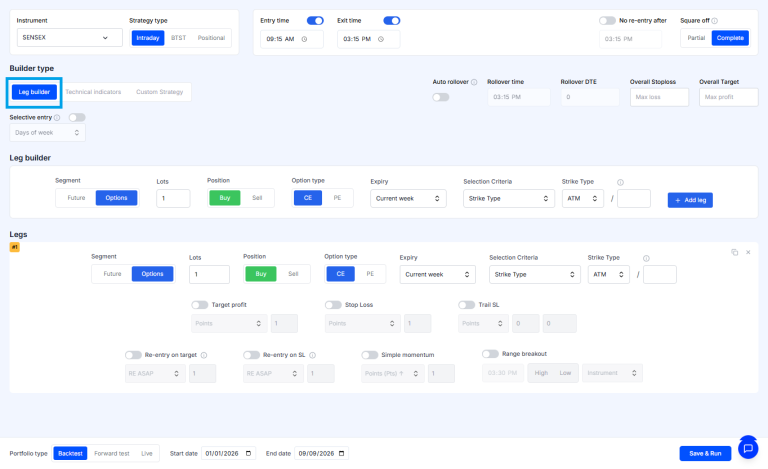
The Leg Builder is designed for strategies made up of multiple positions, also called legs. It is ideal for options traders.
Common uses:
You can set:
This helps you define the overall payoff and risk of the combined positions.
To learn more about how multi-leg option strategies work, see our guide on options trading.
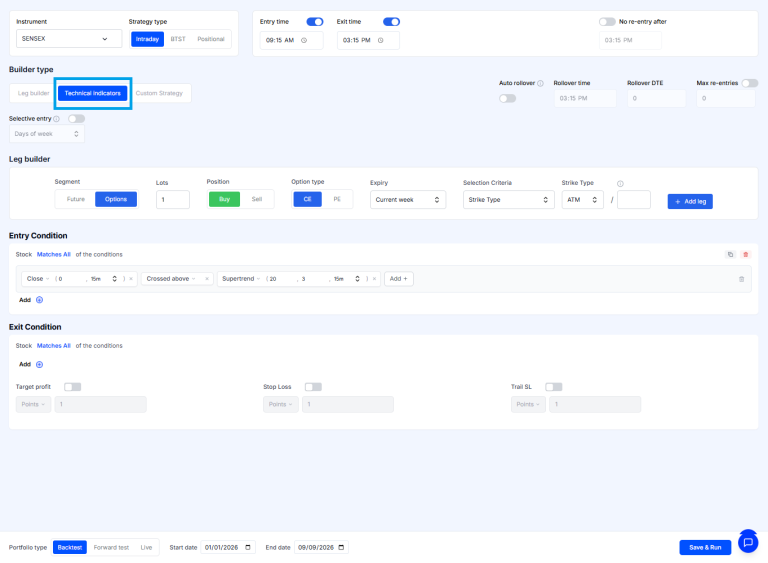
The Technical Indicator Builder is for traders who use technical analysis.
You can build strategies using indicators such as:
Example rule:
This builder is suitable if you already use charts and indicators for your decisions. If you are new to this, start with our technical analysis basics.
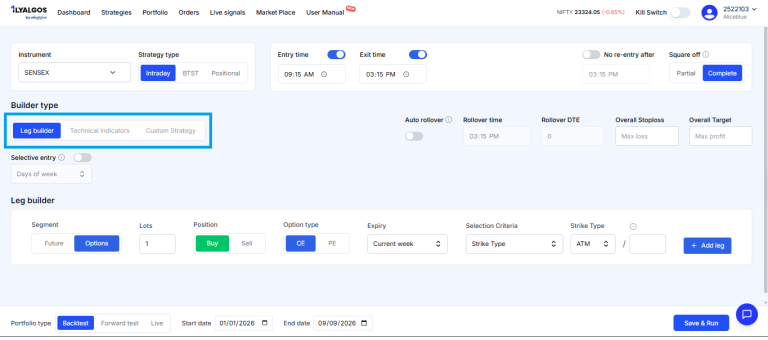
The Custom Strategy Builder is for users who create signals on TradingView or another external platform.
Typical flow:
This option is better for users who:
Let us see how a DIY Builder can be used in a real situation.
Scenario
Rahul thinks Nifty will go up over the next week. He does not want to buy futures directly, so he decides to create a bull call spread using the Leg Builder.
Strategy setup
Net premium paid:
180 − 90 = 90 rupees
Maximum loss if both options expire worthless, ignoring charges:
90 × 65 = 5850 rupees
Rahul sets a stop-loss in the builder. He will exit if the spread value falls by 40 rupees per unit.
Stop-loss loss:
40 × 65 = 2600 rupees
Assume the difference between the two strike prices is 200 points.
Maximum payoff before premium:
200 × 65 = 13000 rupees
After subtracting the net premium paid:
13000 − 5850 = 7150 rupees
So the maximum theoretical profit is 7150 rupees before brokerage, taxes, and other charges.
In simple words, Rahul knows his maximum loss before he enters the trade; he knows his best-case profit, and he has a stop-loss to cut the trade if it moves against him.
Your actual result will depend on how the market moves, liquidity, the price you get, and the charges you pay.
To understand how such strategies behave in different market conditions, you can explore our backtesting and risk management guides.
A DIY strategy builder can be helpful in several ways:
Many beginners ask, should I use a ready-made strategy or build my own? Here is a simple comparison.
Parameter | DIY Builder | Pre-Built Strategy |
Who designs the strategy | You design it based on your idea | Designed by the platform or a third party |
Flexibility | High. You can change rules as needed | Limited to the options provided |
Learning curve | Requires understanding of rules, risk, and testing | May need less setup knowledge, but you still must understand the strategy |
Testing | You can backtest and forward test your own rules | Historical results may be shown, but you should still test and understand risks |
Responsibility | You are responsible for the logic and risk | You are still responsible for understanding how it works and the risks involved |
Best suited for | Traders with a clear market view who want control | Users looking for ready-made ideas and faster setup |
Using a pre-built strategy can save time, but you should never use one just because its past returns look attractive. A DIY builder gives more control, but that control comes with more responsibility.
If you are confused between Leg Builder, Technical Indicator Builder, and Custom Strategy Builder, this comparison will help.
Builder | Best For | Typical User |
Leg Builder | Options strategies like spreads, straddles, and hedged positions | Options traders who combine multiple legs |
Technical Indicator Builder | Indicator-driven entries and exits like RSI, moving averages, MACD | Traders who rely on charts and technical indicators |
Custom Strategy Builder TradingView | External or custom logic via webhook signals | Advanced users automating strategies from TradingView or other platforms |
Choose the builder that matches your current skills and trading style. You can start with one and explore others as you learn.
If you are new to DIY strategy builders, follow a simple 30-day plan to reduce risk and build confidence.
Do not change the rules just to make the backtest look better.
This plan helps you move from learning to live trading in a structured way.
A high historical return does not mean the strategy will give the same result in the future. Study losing periods, drawdowns, and the market conditions in which the strategy failed.
A strategy that looks profitable before charges may become unprofitable after brokerage, taxes, slippage, and bid-ask spreads. Include realistic costs in your testing.
More conditions do not always make a better strategy. Too many rules can reduce the number of trades and make the strategy fit past data too closely, which is overfitting.
Do not move directly from an idea to live trading. Use backtesting, then forward testing, then small-scale live trading.
A target without a loss limit can expose your account to a large adverse move. Always define the maximum acceptable loss before placing the trade.
A wrong symbol, expiry, strike, quantity, or alert message can result in an incorrect order. Test the complete signal flow before live use.
A builder follows instructions. It does not understand news, liquidity shocks, or unusual market conditions. You must understand the strategy and monitor its operation.
A DIY strategy builder may suit:
It may be less suitable for someone who:
If you are a complete beginner, start with education, paper trading, and small positions. Use our risk management and backtesting resources to build a strong base before using advanced automation.
A DIY Builder helps you turn a market idea into a rule-based strategy without writing code. You can use a Leg Builder for options positions, a Technical Indicator Builder for indicator-based signals, or a Custom Strategy Builder for TradingView logic. Start with simple rules, test thoroughly with backtesting and forward testing, and define your risk limits clearly. Backtests can support your analysis, but they cannot guarantee future results. Begin small, monitor every live configuration, and keep learning as you go.
A DIY strategy builder is a no-code tool that lets you create custom trading strategies. You set entry and exit rules, targets, stop losses, and testing modes like backtesting, paper trading, and live execution.
It can be suitable for beginners who first learn basic trading concepts and start with simple rules. New traders should begin with backtesting and paper trading before using real money.
A Leg Builder creates strategies using multiple positions, such as option spreads and straddles. A Technical Indicator Builder uses conditions based on indicators like RSI, moving averages, or MACD.
Yes, a Leg Builder can help you combine option positions through a no-code interface. However, you still need to understand option premiums, strike prices, expiry, margin, and risk before using the strategy.
Forward testing or paper trading means running a strategy in live market conditions without using real money. It helps you see how the strategy behaves in real time before risking capital.
No. A DIY builder only follows the rules you set. Market conditions, execution costs, liquidity, and incorrect assumptions can all lead to losses.
A Custom Strategy Builder may support TradingView connectivity through webhooks. Before going live, check the platform documentation, test the alert flow, and confirm that symbol, quantity, order type, and risk controls are correct.
Attention Investors!
Stock Brokers can accept securities as margin from clients only by way of pledge in the depository system w.e.f. September 1, 2020. Update your mobile number & email Id with your stock broker/depository participant and receive OTP directly from the depository on your email id and/or mobile number to create a pledge. Pay 20% upfront margin of the transaction early to trade in the cash market segment. Investors may please refer to the Exchange’s Frequently Asked Questions (FAQs) issued vide circular reference NSE/INSP/45191 dated July 31, 2020, and NSE/INSP/45534 dated August 31, 2020, and other guidelines issued from time to time in this regard. Check your Securities /MF/ Bonds in the consolidated account statement issued by NSDL/CDSL every month.
Corporate Office: No. 153/2, 3rd Floor, M.R.B.Arcade, Bagalur Main Road, Dwaraka Nagar, Yelahanka, Bengaluru – 560 063, Karnataka.
Registered Office: Old No.56/2 ,New No.58, LIC Nagar, Vinayagar Kovil Street, Erode -8,Tamil Nadu– 638002.
Alice Blue Financial Services (P) Ltd : NSE EQ | NSE FO | NSE CDS-90112 SEBI REG : INZ000156038
Alice Blue Financial Services (P) Ltd : BSE EQ | BSE FO | BSE CD-6670 SEBI REG : INZ000156038
Alice Blue Financial Services (P) Ltd : CDSL DP ID 12085300 DP SEBI REG : IN-DP-364-2018
Alice Blue Financial Services (P) Ltd : MCX-56710 SEBI REG : INZ000156038
We hereby declare that we are doing PRO trading
Procedure to file a complaint on SEBI SCORES : Register on SEBI SCORES 2.0. Mandatory details for filing complaints on SCORES: Name, PAN, Address, Mobile Number, E-mail ID. Benefits: Effective Communication, Speedy redressal of the grievances
Click on the provided link to learn about the process for submitting a complaint on the ODR platform for resolving investor grievances.
Investment in securities markets are subject to market risks, read all the related documents carefully before investing. Brokerage will not exceed SEBI prescribed limit.
For queries regarding account opening or activation, email to [email protected] and for fund updates, email to [email protected]
Disclaimer : Prevent unauthorized transactions in your account. Update your mobile numbers/email IDs with your stock brokers. Receive information of your transactions directly from Exchange on your mobile/email at the end of the day. Issued in the interest of investors. All clients have to update their email id and mobile number with Member : Investor Grievance [email protected]
KYC is a one time exercise while dealing in securities markets – once KYC is done through a SEBI registered intermediary (broker, DP, Mutual Fund etc.), you need not undergo the same process again when you approach another intermediary.
No need to issue cheques by investors while subscribing to an IPO. Just write the bank account number and sign in the application form to authorise your bank to make payment in case of allotment. No worries for refund as the money remains in the investor’s account.
Investors are requested to note that Alice Blue Financial Services Private Limited is permitted to receive money from investor through designated bank accounts only named as Up streaming Client Nodal Bank Account (USCNBA). Alice Blue Financial Services Private Limited is also required to disclose these USCNB accounts to Stock Exchange. Hence, you are requested to use following USCNB accounts only for the purpose of dealings in your trading account with us. The details of these USCNB accounts are also displayed by Stock Exchanges on their website under “Know/ Locate your Stock Broker. Bank Details (Valid UPI FAQ).


